0
ВАША КОРЗИНА ПУСТА
Выбирайте из 20000 игр от последних хитов
до нестареющей классики.
Ваша корзина
Общая сумма: 0

Купить Lossless Scaling

Оценки игроков: Очень положительные
Купить Lossless Scaling
Регион:
Россия, страны СНГ
Язык:
Английский

All-in-one gaming utility for scaling and frame generation

Подробнее

Скоро
Активация:
Steam
Ожидается поступление
  • Данный товар закончился, но мы нашли для вас похожие товары

13
лет продаем игры
4.300.000+
ключей выдали
250.000+
настоящих отзывов
3.100+
игр в наличии
Описание

All-in-one gaming utility for scaling and frame generation

Активация продукта в Steam
  1. Получите оплаченный товар в разделе Мои покупки.
  2. Если не установлен Steam клиент, скачайте его для Windows (клиент также доступен на Mac и Linux) и установите.
  3. Запустите Steam, зайдите в свой аккаунт или зарегистрируйте новый, если у вас его еще нет.
  4. Войдите в меню «Игры» и выберите пункт «Активировать через Steam».
  5. Примите соглашение подписчика Steam.
  6. Введите ключ активации (для его получения необходимо купить Lossless Scaling).
  7. После активации вам будет предложено скачать игру Lossless Scaling.

Ключ также можно активировать через браузер.

Детали игры
Работает на:
Дата выхода:
28 декабря 2018
Издатель:
THS
Комментарии и отзывы (0)
Если у Вас не отправляются сообщения - почистите cookie в браузере и авторизуйтесь заново :)
Обзоры в Steam
asphyxia
Рекомендую
Опубликовано: 01 июл в 14:45

Еще не до конца разобрался с настройками этой программы и не знаю ее максимального потенциала, но она уже помогает мне с комфортом играть в некоторые игры. Допустим в helldivers у меня средние 60 фпс превращаются по ощущениям в плавные 100 фпс. Пробовал в сингловых играх, там уже ситуация не такая однозначная, где-то видны артефакты. В общем, буду дальше разбираться, но за свою цену программа действительно хороша

▲▼Adrewertr▼▲
Рекомендую
Опубликовано: 10 июл в 22:42

Отличное решение, чтобы выровнять fps

Comrade Marik
Рекомендую
Опубликовано: 12 июл в 17:55

Классная штука, спасла мой вяленький фэпас ни один раз!

0R33TDR3
Рекомендую
Опубликовано: 17 июл в 10:41

если у вас видеокарта gts 450 всем советую или же для эмуляторов всяких где лимит 30 кадров

Blufferr
Рекомендую
Опубликовано: 30 июл в 15:22

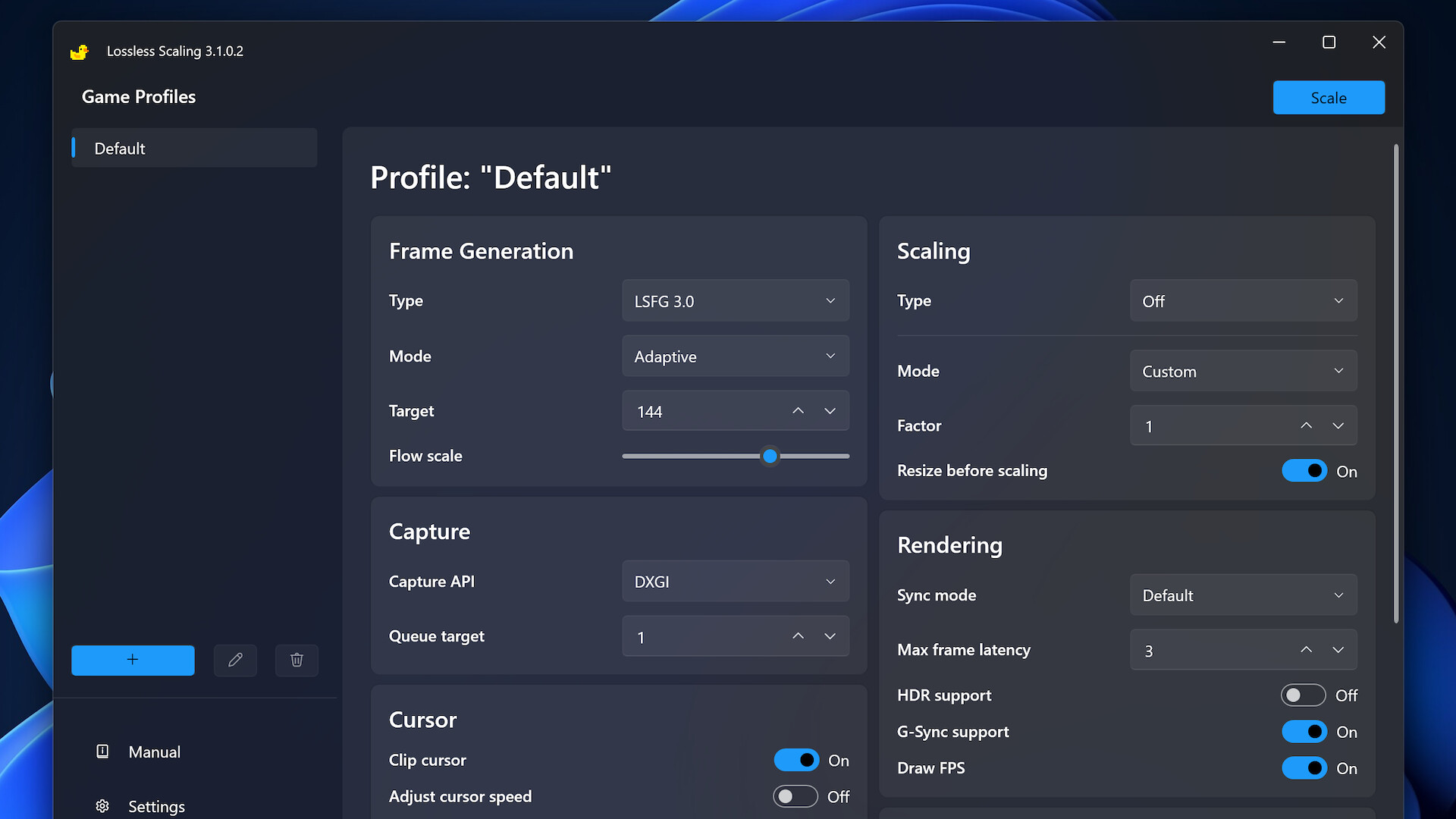
Hello everyone, this will be a review of the lossless scaling application for beginners. And I will also show you the best settings. - Profile Default - in the type you should set LSFG 3.1 at the moment. Now I will tell you the difference between the adaptive mod and fixed, the adaptive mod targets an integer number of fps. that is, you can set, for example, 144 fps and you will have 144 fps in the game. and the other type "fixed" is better to set to 2, because if on 1 there will be a small. Hello everyone, this will be a review of the lossless scaling application for beginners. And I will also show you the best settings. - Profile Default - in the type you should set LSFG 3.1 at the moment. Now I will tell you the difference between the adaptive mod and fixed, the adaptive mod targets an integer number of fps. that is, you can set, for example, 144 fps and you will have 144 fps in the game. and the other type "fixed" is better to set to 2, because if on 1 there will be a small. fps increase and small delay, and if you put 3 or more then there will be a lot of fps but a big delay between actions, that is, input lag. Now the Scaling section - for games it is better to set the FSR type, if you want a good picture, for example 4k, then set anime4k, but I advise you to leave it on FSR. Mode - it is better to set it in the first auto, and in the second by choice, if you play in full screen (16:9) set fullscreen, and if with a custom. resolution, then aspect ratio! Capture section - there set WGC in capture API, and in queue target always set 1. Now Rendering - Now it will be very important in your choice, in sync mode ALWAYS set off (allow tearing) many do not know about this, but this setting reduces the delay very much. Next Max Frame Latency: 3. and hdr support / g - sync support / Draw Fps set at your discretion, I only have draw fps enabled. Next, do not touch the Cursor and Crop input sections, we do not need them. Next, GPU and Display: Preffered GPU, you can have your video card there and something else, always take your video card, for example, Nvidia, Output Display: Set to Auto Well, that's all, here I told you the important settings and features of this program, don't be afraid to buy it and I also ask you to support me with reactions ❤️